小度经验网
首页
美食营养
生活百科
知识问答
生活知识
返回
小度经验网
首页
美食营养
游戏数码
手工爱好
生活知识
生活百科
健康养生
运动户外
职场理财
情感交际
母婴教育
时尚美容
知识问答
更多知识
搜索
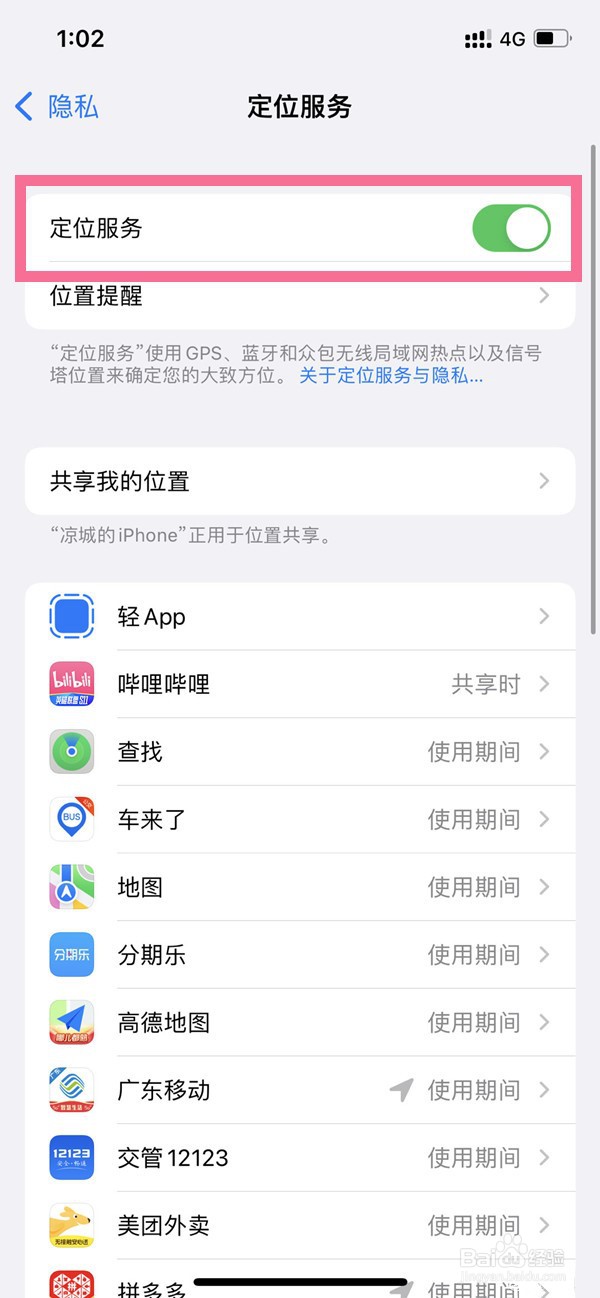
苹果14plus怎么关闭定位
2026-04-23 03:04:33
1、打开手机设置,点击【隐私与安全性】。
2、点击【定位服务】选项。
3、关闭【定位服务】右边的开关即可。
相关推荐
苹果14如何关闭共享位置的应用
阅读量:145
苹果13怎么修改锁屏密码
阅读量:117
苹果14的APP请求跟踪功能在哪关
阅读量:36
iphone14pro定位服务功能如何关掉
阅读量:139
iphone11飞行模式开启方法
阅读量:168
猜你喜欢
香芋地瓜丸的做法
鱿鱼须的做法大全
职业规划怎么写
泡菜的做法大全
溜肥肠的做法
冰淇淋的做法最简单的做法
泡菜的做法大全家常
蓓怎么读
象拔蚌的做法
红枣银耳汤的做法
猜你喜欢
邕字怎么读
鱼的做法大全家常
tall怎么读
热可可的做法
水果布丁的做法
番茄意大利面的做法
干煸鸡的做法
红烧豆腐的家常做法
煲粥食谱大全及做法
猪蹄冻的做法