svchost占用内存过高如何处理
1、找到计算器,右击打开,选择“管理”。
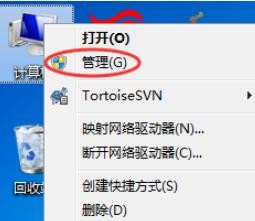
2、然后在左侧框中,选择“服务和应用程序”中的“服务”。

3、然后在右侧中,寻找到“Superfetch”,然后双击打开。

4、在“启动类型”中,更改到“”手动。

5、然后确定,就可以了。

6、重启电脑以后,svchost内存占用就回归正常了。

阅读量:195
阅读量:180
阅读量:20
阅读量:149
阅读量:136
1、找到计算器,右击打开,选择“管理”。
2、然后在左侧框中,选择“服务和应用程序”中的“服务”。
3、然后在右侧中,寻找到“Superfetch”,然后双击打开。
4、在“启动类型”中,更改到“”手动。
5、然后确定,就可以了。
6、重启电脑以后,svchost内存占用就回归正常了。