小度经验网
首页
美食营养
生活百科
知识问答
生活知识
返回
小度经验网
首页
美食营养
游戏数码
手工爱好
生活知识
生活百科
健康养生
运动户外
职场理财
情感交际
母婴教育
时尚美容
知识问答
更多知识
搜索
潮汐app如何注销账号
2026-04-24 22:07:37
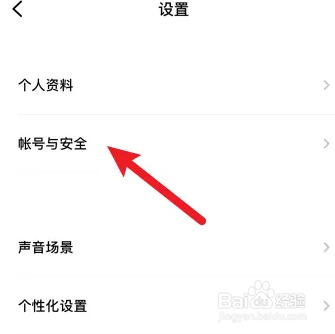
1、进入潮汐APP,点击更多设置,选择账号与安全。
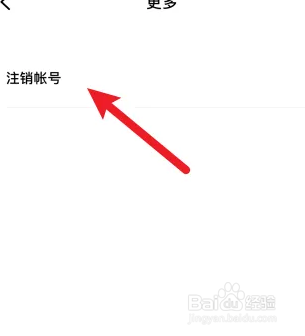
2、选择更多,点击注销账号。
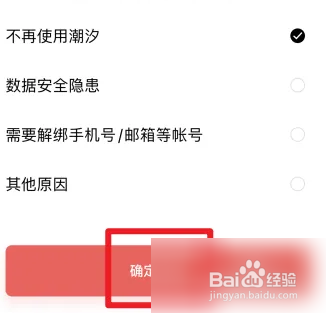
3、选择注销原因,点击确定注销即可。
相关推荐
潮汐APP如何添加声音
阅读量:126
潮汐怎么注销账号
阅读量:170
潮汐APP如何清理缓存
阅读量:90
潮汐APP如何设置繁体中文
阅读量:62
潮汐APP如何开启潮汐泡泡
阅读量:90
猜你喜欢
嫩豆腐的做法大全
好句大全20字
墙壁纸图片大全
周公解梦2345解梦大全
7座商务车大全报价
儿童食谱大全
网上怎么订火车票
日本姓氏大全
玫瑰花语大全
模拟人生3怎么结婚
猜你喜欢
怎么才能让皮肤变白
跑步怎么跑得快
欠钱还不起怎么办
乌龟不吃食怎么办
药品大全
学习网站网址大全
发型大全
酿豆腐怎么做
怎么取消银行卡
食物相克大全