如何设置icofx软件使用默认的gif/apng设置
1、点击“icofx”

2、在弹出窗口中,点击“Options"
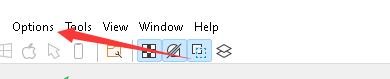
3、在弹出下拉栏中,点击“Preferences”

4、在弹出窗口中,点击“Options”

5、在弹出窗口中,找到“Save Options”

6、在栏目窗口中,将“Use default gif/apng settings”

7、点击“OK”即可

阅读量:84
阅读量:173
阅读量:140
阅读量:125
阅读量:188
1、点击“icofx”
2、在弹出窗口中,点击“Options"
3、在弹出下拉栏中,点击“Preferences”
4、在弹出窗口中,点击“Options”
5、在弹出窗口中,找到“Save Options”
6、在栏目窗口中,将“Use default gif/apng settings”
7、点击“OK”即可