省鸭app如何兑换红包
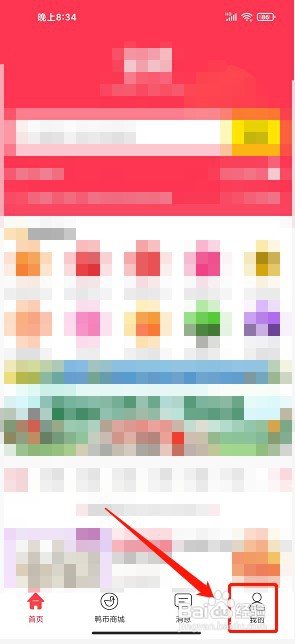
1、进入省鸭app首页,点击"我的",如图所示
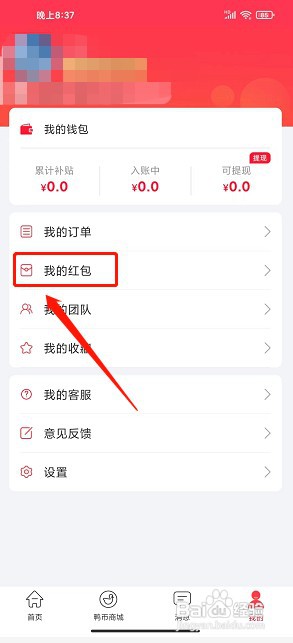
2、进入我的界面,点击"我的红包",如图所示
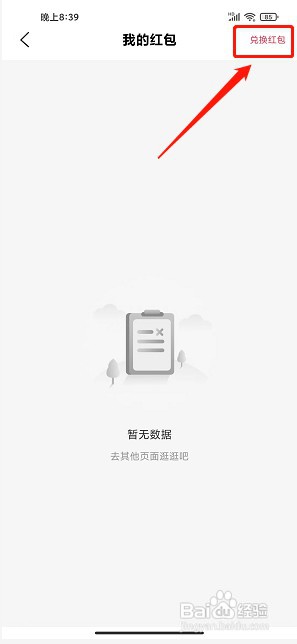
3、进入我的红包界面,点击"兑换红包",如图所示
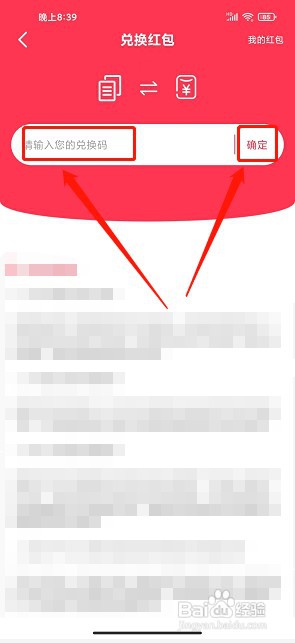
4、进入兑换红包界面,输入兑换码,点击"确定",如图所示
阅读量:160
阅读量:61
阅读量:35
阅读量:143
阅读量:111
1、进入省鸭app首页,点击"我的",如图所示
2、进入我的界面,点击"我的红包",如图所示
3、进入我的红包界面,点击"兑换红包",如图所示
4、进入兑换红包界面,输入兑换码,点击"确定",如图所示