小度经验网
首页
美食营养
生活百科
知识问答
生活知识
返回
小度经验网
首页
美食营养
游戏数码
手工爱好
生活知识
生活百科
健康养生
运动户外
职场理财
情感交际
母婴教育
时尚美容
知识问答
更多知识
搜索
iphone单手操作怎么关闭?
2026-04-23 10:39:32
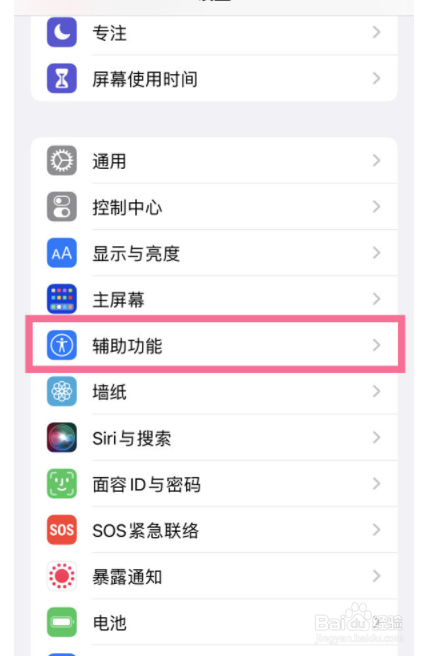
1、在手机设置菜单中点击【辅助功能】。
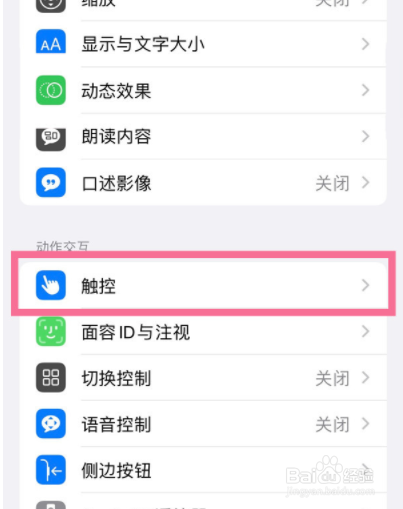
2、点击【触控】选项。
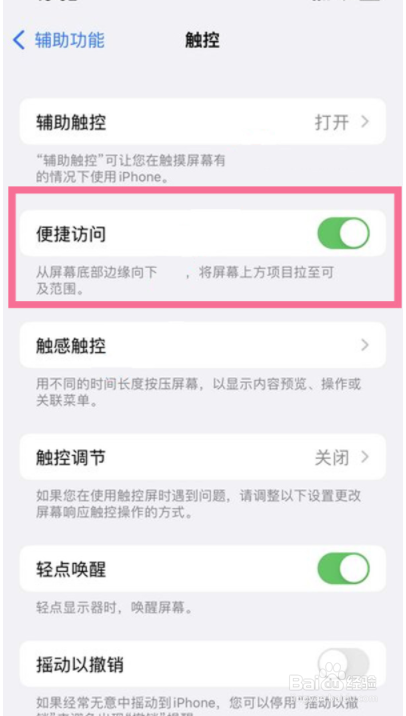
3、关闭【便捷访问】右侧的开关即可。
相关推荐
iphone13在哪关闭siri建议
阅读量:20
iPhone手机Siri搜索建议怎么关闭
阅读量:189
苹果手机怎么移除控制中心的控制
阅读量:112
怎么关闭iphone锁屏搜索
阅读量:175
苹果手机怎么关闭接收新数据推送
阅读量:89
猜你喜欢
张骞是哪里人
珠海高铁站在哪里
虚拟家庭怎么生孩子
zuk手机怎么样
苹果手机怎么激活id
老婆有外遇怎么查
高铁旅游线路
脸上的痘印怎么去
香港电话怎么拨打
巴塞罗那旅游
猜你喜欢
科雷傲怎么样
晚安的朋友圈说说
阿尔卑斯山在哪里
手机缓存的视频在哪里
丽江旅游旺季
e代驾司机收入怎么样
一字眉怎么修
路由器ip
怎么修改qq账号
球形锁怎么拆图解